Atli Groups lets one card pay for other people’s travel eSIMs. You decide who can use it, where they can buy and how much they can spend. Each person buys their own plan on heyatli.com or in the Atli app and picks the group at checkout. Nobody has to pass the card number around or claim the cost back on expenses.
You run the group from groups.heyatli.com. It suits a company sending staff abroad, and it works the same way for a tour, a school trip or a family where one person pays.
Setting up a group
- Go to groups.heyatli.com and sign in. If you don’t have an Atli account yet, signing in creates one.
- Press Create your first Atli Group. The wizard asks for a name and for the people who can buy. Members see the name when they pay. Coverage and limits come next. Both start fully open, so set them here if you want caps from the first purchase. You can change them any time. Your answers are saved on the device as you go.
- Add a card when the dashboard asks for one. Nobody can buy with the group until it has a card it can charge.
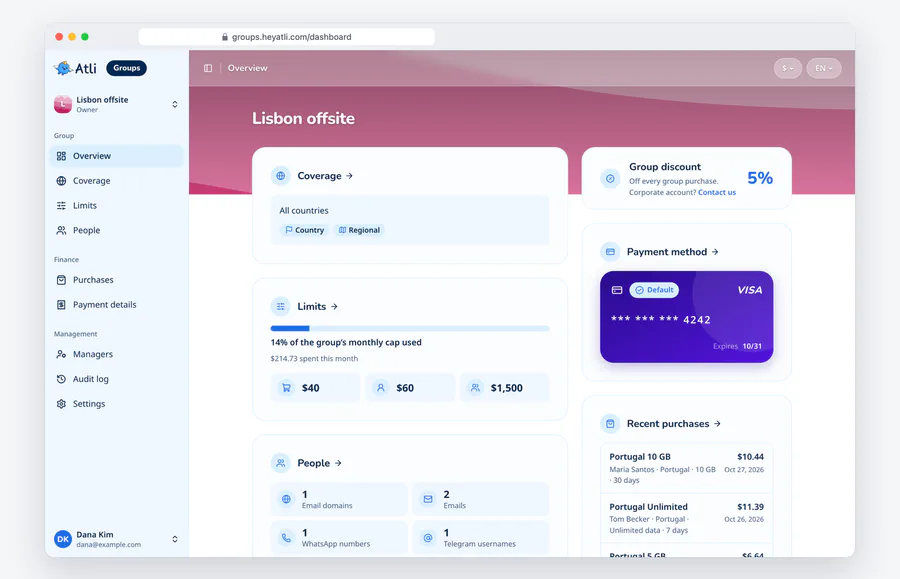
- If you listed a domain, open People, choose How to verify next to it, add the TXT record where your domain’s DNS is managed and press Check now.
- If you need invoices, fill in your company details under Payment details before anyone buys.
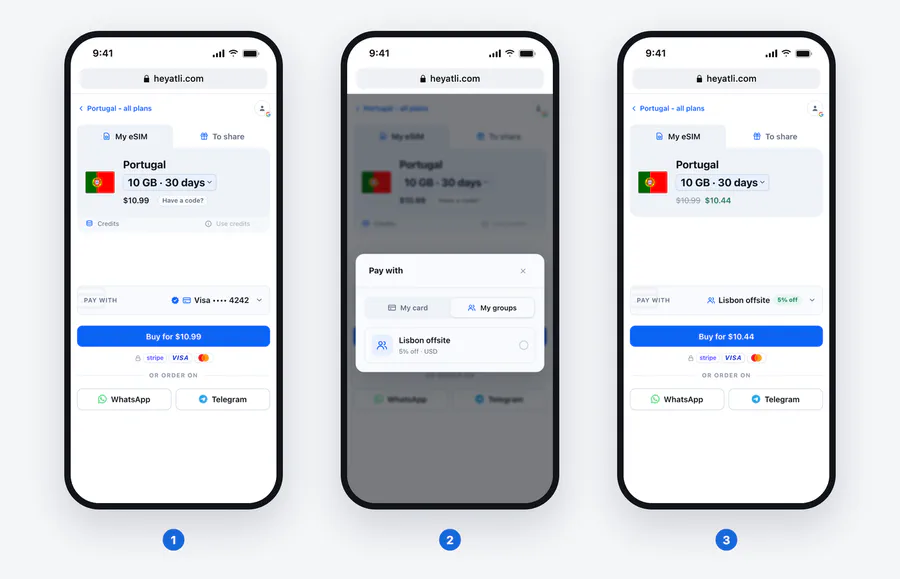
- Tell people to buy on heyatli.com or in the Atli app and to choose the group under Pay with.
What members see at checkout
There is no invitation to accept and nothing for members to sign up for. When someone signs in to Atli with an email address, WhatsApp number or Telegram username that your list covers, the group appears in their checkout. They have to be signed in, because a checkout without an account can’t use a group.
They choose a plan as usual. Under Pay with, they switch from My card to My groups and pick your group. The price changes to the group’s price in the group’s currency, and Buy charges the group’s card at once. There is no card form to fill in. The plan arrives like any other Atli purchase, and the receipt says which group paid.
If the group can’t pay, checkout says why: a destination or plan type the group doesn’t cover, a spending limit, or a declined card. The buyer can still pay with their own card.
Group payment works on heyatli.com and in the Atli app. The Atli chats on WhatsApp and Telegram can’t use the group’s card. People you listed by WhatsApp number or Telegram username use the group by signing in to the website or the app with that WhatsApp number or Telegram account. Each person still needs a phone that takes an eSIM.
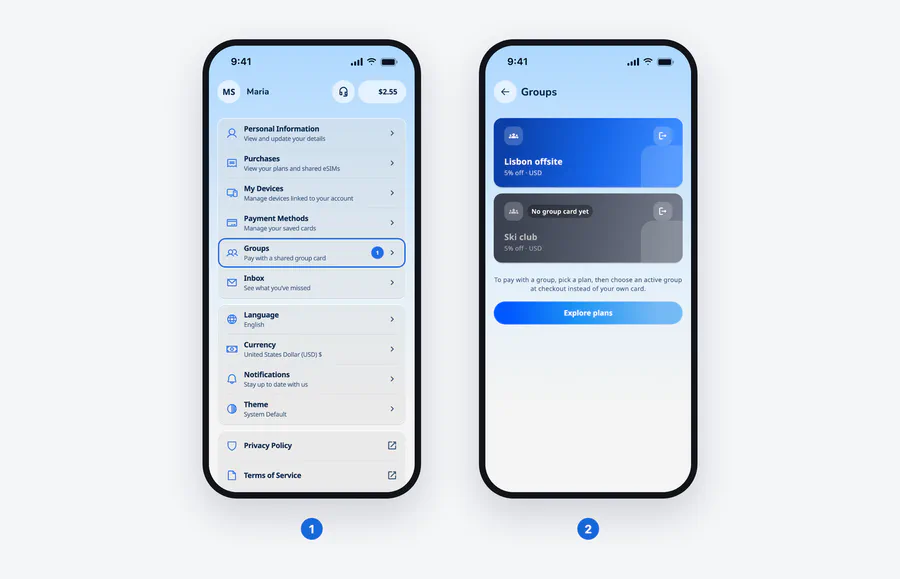
In the app, members find their groups under Profile > Groups. A group that can’t pay shows the reason there, and No group card yet means it has no card to charge. The app’s checkout has the same Pay with choice as the website. Creating and running a group stays on groups.heyatli.com.
Who can buy with the group
Your list can mix four kinds of entry:
- An email address. It matches an account that signs in with that address by email, Google or Apple.
- A domain like yourcompany.com. Everyone with an address there can buy once the domain is verified.
- A WhatsApp number including the country code. It matches an account that signs in with WhatsApp.
- A Telegram username. It matches an account that signs in with Telegram.
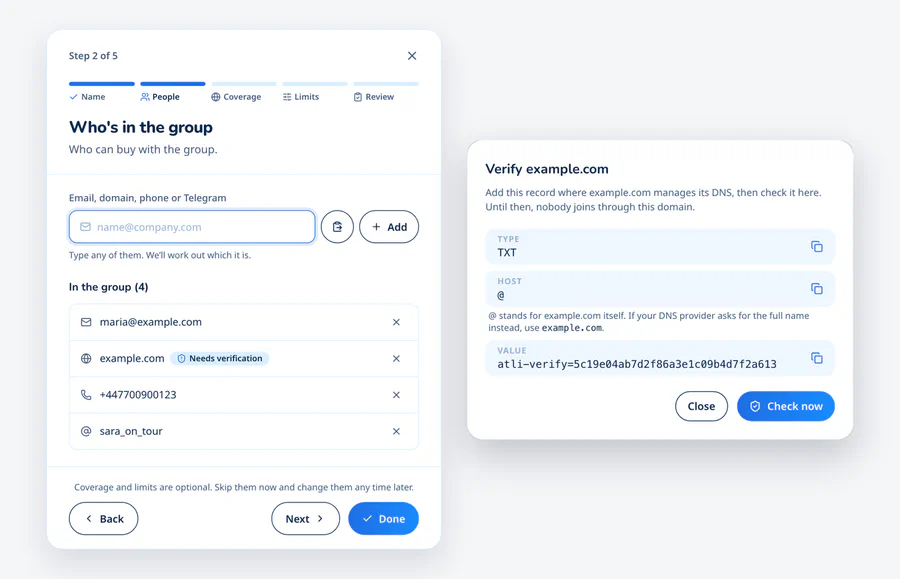
A domain lets nobody in until it is verified, and Atli keeps checking the record afterwards. If the record is removed, the domain stops letting people in. DNS changes can take up to a day to show, so add the record a day before people need to buy. Public email domains such as gmail.com can’t be added; list those people one address at a time.
Someone who signs in with Apple and hides their email reaches Atli with a relay address. Your domain won’t match it, so add that address on its own or ask them to sign in another way.
To stop one person buying, an admin blocks them on People. They stay on the list in grey, and one press lets them back in. Blocking is how you cut off someone who has left the company while their mailbox at your domain still exists.
Coverage and spending limits
Coverage decides where members can buy. For single-country plans you choose every country, only the countries you pick, or every country except a few. Regional plans and global plans each have their own switch. A regional plan covers a whole region like Europe in one purchase.
Three limits decide how much:
- The most one purchase can cost. The group discount comes off first.
- The most each person can spend in a month. One figure applies to every member.
- The most the whole group can spend in a month.
Leave a limit empty and there is none. A new group allows every country, every plan type and any amount. People your list covers can buy as soon as the group has a card, so set your limits before you add one. Months follow the calendar in UTC. A purchase that would go over a limit is refused at checkout, and two purchases made at the same moment can’t both slip past a cap.
Leave room in the per-purchase limit for the plan size people will need. The trip data guide helps you judge how much data a trip takes. On People, managers can see what each member has spent this month and what is left of their limit.
Discount, credits and the card
Every plan bought with a new group costs 5% less. Atli sets each group’s discount, and a company that wants a bigger one can write to [email protected]. Promo codes, referral codes and Atli credits can’t be used on a group purchase.
The member who buys still earns Atli credits on it. Credits are counted on what the group paid after its discount, and they are the member’s to spend on their own trips.
The group pays by card. You add it through Stripe, and your bank may ask you to confirm it. Each purchase is charged to the default card as it happens, so there is nothing to prepay. Managers only see a card’s brand, last four digits and expiry date. The group is charged in one billing currency. It is US dollars unless you pick another.
Reports and invoices
The Purchases page shows one month at a time: this month or any of the eleven before it. It opens with what the group spent against its cap and what each member spent against their limit. Then comes every purchase: who bought it, the plan, the price before the discount, its status and the card charged. You can narrow it to one person and download it as a CSV file.
Fill in your company details under Payment details (legal name, address and tax ID, each optional) and every purchase from then on gets a numbered invoice. Purchases made before that have none, so fill them in before the group goes live. Each invoice opens on the Purchases page next to the purchase, and you can print it or save it as a PDF. Month’s summary opens the whole month as a statement to print.
Managers and roles
Managers run the group. Each needs an Atli account, and an owner adds them by email, Telegram username or WhatsApp number. There are four roles:
- Viewer sees the settings, the members, the cards, every purchase and the audit log.
- Admin also changes coverage, limits and payment details, edits the list of who can buy, blocks people and manages the cards.
- Owner also adds managers and changes their roles.
- Primary owner is the one person who can hand the group to another manager or suspend it. At first that is whoever created the group.
Being a manager doesn’t let anyone buy with the group. Only the list does. A finance colleague can follow every purchase without being able to buy, and an organiser who wants to buy on the group card adds their own email to the list.
The Audit log shows who changed what in the group and when. Suspending the group stops all group purchases at once and keeps everything else. The primary owner can lift their own suspension with one press.
Checked against groups.heyatli.com, the heyatli.com checkout and the Atli app, October 2026.